
Insurance defense attorneys first need to understand the medical history behind a claim to explain it to insurers, medical experts, mediators, and juries. However, because lawyers aren’t doctors or medical professionals, this can be challenging.
Luckily, specialized tools exist to help lawyers interpret and present this complex medical data more effectively, such as:
- Wisedocs
- Aeon Timeline
- TrialPad
- RadiAnt DICOM Viewer
- MediVisuals + High Impact
In this article, we’re exploring the differences between these tools to help you find the right fit for your law firm.
Tools to help you understand medical records and present your findings
Wisedocs
We’ll start with our own platform, as we’re the ones writing this article. Wisedocs helps insurance defense teams organize medical records, investigate conflicting findings, and prepare summaries and reports about the evidence behind a claim.
To do this, the Wisedocs 2.0 platform connects document processing with case analysis so that you can make accurate and faster decisions. AI insights surface important information, while our custom case analyzer produces reports so that your attorneys get an immediate understanding of the case specific to the line of business.
For example, our claim consistency AI analyzer may find that a claimant with a condition that required continuous treatment went several months without seeing a specialist. Or that the injury location cited in the medical records has switched from one side of the body to the other.
You can then use the AI-enabled claims tool to examine the timeline for gaps, read the notes around those periods, and collect the relevant findings for a medical expert. All with full citations to the original source document.
“Attorneys want clean facts, not guesses. They want sets of facts they can measure, so they can build a strategy for how to present the evidence or how to discredit it.”
— Alexander Temelkovski, Head of Enterprise Programs at Wisedocs
Core features include:
- AI-powered medical chronologies: Automated indexing and deduplication organize records by date, provider, and event, reducing the work of reconstructing treatment across separate uploads.
- AI-enabled medical summaries: Summaries condense documented symptoms, findings, diagnoses, and treatment specific to document type. Source references let you read the provider’s wording and surrounding context.
- Extraction before summarization: Wisedocs extracts details from the original records first to quickly surface key information. Those details remain searchable even when a shorter summary leaves them out.
- Questions and analysis: WiseChat answers questions about the file with citations for full defensibility. Analyzers flag potential missing documentation, treatment gaps, and conflicting accounts.
- Human review: Expert-in-the-loop review routes documents below the AI confidence threshold to medical industry specialists for further analysis. Review scope depends on the documents and requirements.
- Reports and secure sharing: Custom Reports let you generate tailored reports based on relevant findings, edit the content, and export the final outputs via Word documents or PDFs. WiseShare then provides controlled access when sharing records with colleagues or medical experts.
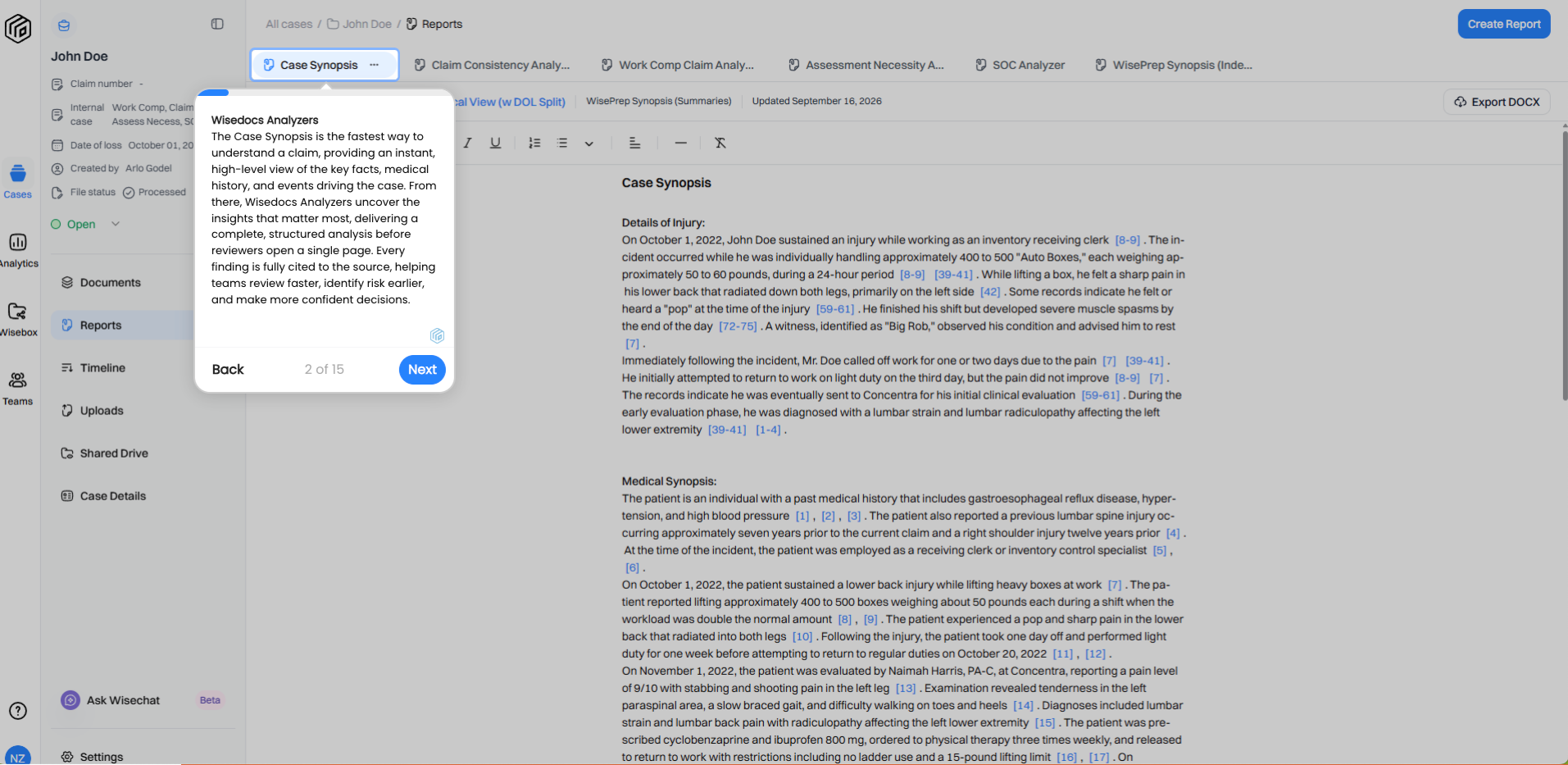
Example of a Wisedocs Case Synopsis bringing together injury details and medical history, with citations attorneys can follow when preparing questions for a medical expert.
We know the needs of law firms can be different, so here are four more tool alternatives.
Aeon Timeline
Aeon Timeline lets you organize case events into visual timelines for client discussions and courtroom presentations. Your team can map the incident alongside earlier treatment, subsequent examinations, and changes in documented restrictions. Notes and links to supporting material provide context for each event.
Filters and grouped views let you focus the display on a particular period or person. For example, a timeline could show when symptoms were first recorded and when a specialist later assessed them, making the interval between those events easier to explain. You can print or export case facts for presentations and court documents.
TrialPad
TrialPad lets you organize and display documents, photographs, video, and other exhibits from an iPad. Callouts, highlighting, zoom, and side-by-side displays direct the audience’s attention to specific evidence.
During expert testimony, you could display a restriction in a treatment note beside the passage discussing it in an expert report. You can organize exhibits before trial and select them as testimony develops, so the audience sees the material relevant to the question being discussed.
RadiAnt DICOM Viewer
RadiAnt opens medical imaging files so you can display them during presentation, for instance during expert testimony. It works for many formats, including CT scans, MRIs, and X-rays, on Windows computers. DICOM is the format commonly used to store these images.
When displaying the scans, you can zoom in on the area being discussed and add annotations. Multiple image series can be displayed for comparison, allowing an expert to explain differences between scans taken at different points in treatment. Selected images can also be exported as JPEG, BMP, WMV, MP4 video, and DICOM files for exhibits.
MediVisuals + High Impact
MediVisuals + High Impact creates medical illustrations and animations for personal injury, medical malpractice, and other legal cases. These visuals can show a jury where an injury occurred, which structures were affected, or what happened during surgery.
Your team supplies the medical records and your expert’s explanation, and the illustrators turn that information into an exhibit. For example, an illustration could show the location of a spinal injury and the structures involved in surgery, making the anatomy easier to follow during testimony. This is a service for commissioning medical visuals from specialists.
Build your medical argument with evidence you can explain
An accurate understanding of the records is the first step towards effectively presenting medical information. Wisedocs helps your team trace treatment, investigate findings, and collect relevant documentation for a medical expert.
The most effective presentation tool then depends on the point you need to explain: a timeline can establish the sequence of events, a scan can show the area the expert is discussing, and an illustration can make complex anatomy easier for the audience to understand.
FAQs
What’s the difference between a medical chronology and a timeline for trial?
A medical chronology organizes the treatment history so your team can review what happened across appointments. A trial timeline selects the events relevant to the point you’re explaining and presents them visually. It could show the time between an incident, the first reported symptoms, and a later examination without displaying every appointment in the file.
Can AI medical summaries replace a medical expert’s interpretation?
AI summaries organize the information documented in the records and make it easier to locate supporting passages. A medical expert explains their clinical significance. For example, a summary can bring together imaging findings and reported symptoms, while the expert assesses how those findings relate to the claimed injury or limitations.
When should a law firm hire a medical illustrator?
Law firms could consider an illustrator when the injury or procedure is difficult to explain from written records and scans alone. For example, a surgical report could describe several structures unfamiliar to a jury, but an illustration can show their location and relationship.
Sources
- https://www.aeontimeline.com/solutions/legal-case-timeline
- https://www.aeontimeline.com/solutions/litigation-chronologies
- https://www.aeontimeline.com/buy
- https://www.litsoftware.com/trialpad
- https://www.litsoftware.com/pricing
- https://www.radiantviewer.com/products/
- https://www.radiantviewer.com/store/pricing/
- https://www.highimpact.com/illustration/medical-illustrations

