
In personal injury, insurance defense, and medical malpractice cases, your team can spend hours piecing together treatment histories from scattered records before actually starting to assess the evidence. That preparation leaves less time to investigate the claim or follow up on missing reports before a deposition or settlement deadline.
Specialized medical record review software organizes those files into searchable histories and summaries. The best tools include Wisedocs, EvenUp, Casefleet, Supio, and DigitalOwl (now ChartSwap Insights, part of Datavant). Below, we explain the features attorneys should look for and compare how each platform organizes medical records, checks the output, and protects client information.
What should attorneys look for in medical record review software?
A medical record summary saves little time if your paralegals still have to reconstruct the treatment history or find the records behind its conclusions. With that in mind, you need to evaluate how each platform prepares the file, preserves medical details, and lets your team check and share the results.
The right fit depends on your practice area, record volume, and how much review your team wants to handle themselves. These are the features to consider:
Medical details extracted before summaries are generated
To be able to search and filter medical chronologies by details like provider, treatment, or diagnosis, the software first needs to identify those details in the original documents. This is called entity extraction, and when it takes place makes a difference to the resulting analysis and output accuracy.
If the platform extracts information only after processing (e.g., from an AI summary), any medical details excluded, like a prescription or prior injury, could also be missing from your searches. Instead, look for software that extracts this information before processing takes place. This ensures your analysis gets the greatest level of accuracy and detail.
Auditable outputs you can defend in court
If opposing counsel challenges a finding in your medical summary, you need to be able to show where it came from and how it was verified. That’s why it’s important to choose a platform that keeps findings connected to the original records and provides documentation for any review or corrections during processing.
For instance, every line of a summary should come with a clickable link to the original source. This shows how conclusions are drawn, as well as ensuring you’re not relying on hallucinated AI outputs.
Human review is also key for creating auditable decisions, as described in the NAIC AI guidelines adopted in 25+ states. This intercepts any potential mistakes made by the AI for heightened confidence in its insights. For example, if the AI turns “possible fracture” into a confirmed diagnosis, a medical reviewer should catch that error before the summary reaches your team.
The platform should then record who reviewed an output, when, and what they changed. That history helps you explain how an error was resolved before you relied on the finding in your case.
Secure sharing with control over who can access the records
Sharing sensitive medical records with outside experts requires both accessibility and security controls. The software you choose should give your firm full control over who can open those files, but also meet the relevant laws and security protocols such as HIPAA and SOC 2 Type II.
Look for a platform that lets you set permissions for each recipient and revoke access when their work ends. Other features like encryption and full chain-of-custody audit trails may also be necessary.
Wisedocs
Starting with our own platform, Wisedocs gives defense firms and in-house legal teams an end-to-end platform for organizing medical records, reviewing findings, and making informed in-platform decisions to build your case strategy.
Our Claims Decision Intelligence platform keeps the medical history, analysis, and supporting records in one workspace. For instance, if you’re assessing conflicting opinions about a patient’s work restrictions, you can compare the findings, read the original notes, and investigate the disagreement all in one place.
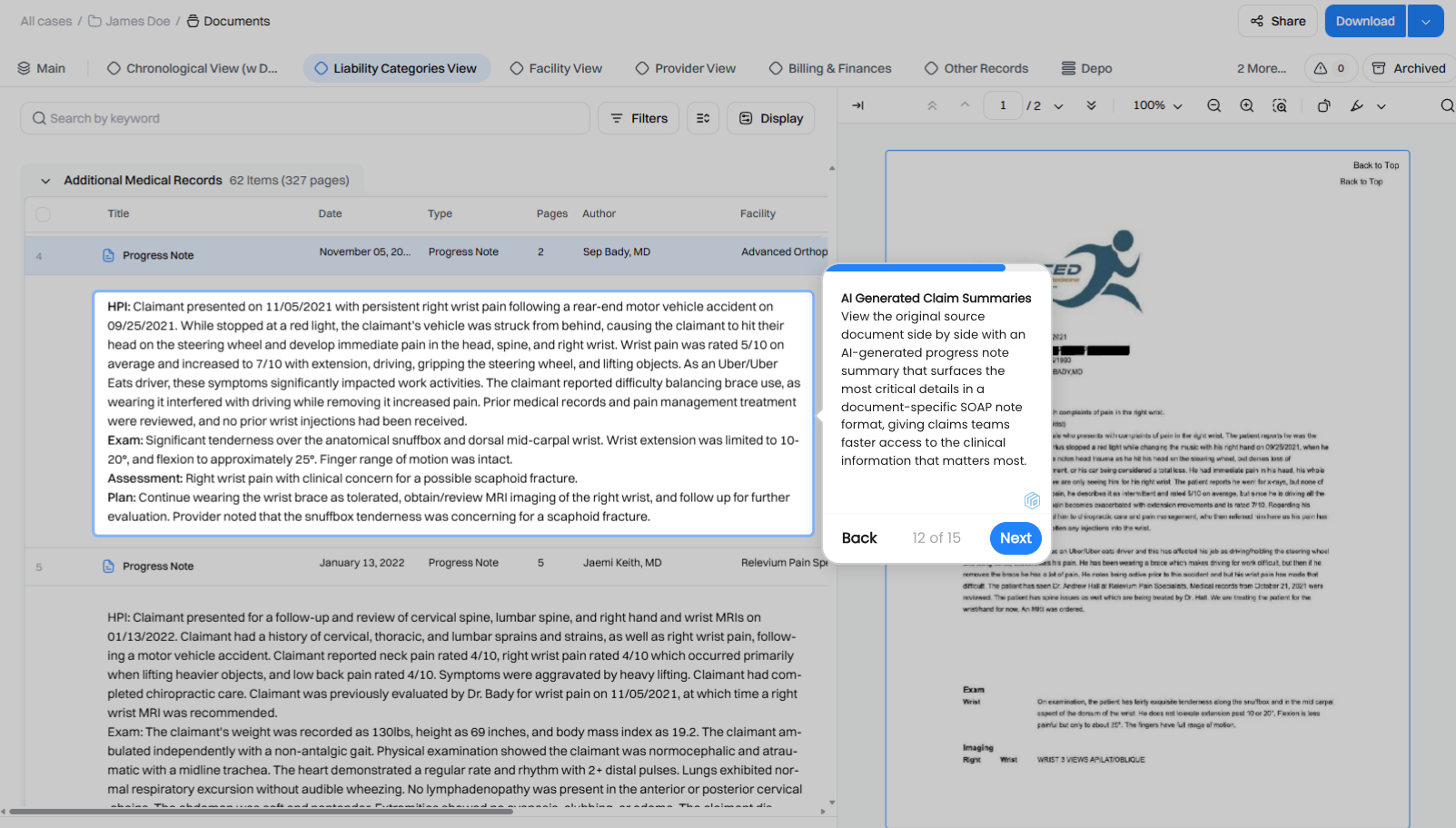
Example of a medical summary in Wisedocs displayed beside the original record, allowing attorneys to check summarized findings against the provider’s notes.
Source citations, expert review, and documented activity then help you build defensible reports for use in court. Your team can explain the evidence behind an assessment and trace findings back to the medical documentation.
Other core features for attorneys include:
- Medical record processing: Automated sorting and indexing, as well as deduplication and the separation of co-mingled documents to reduce the final review package.
- Medical chronologies and summaries: Wisedocs extracts details directly from the original records before generating medical chronologies and medical summaries. Source references let you verify the summarized findings, while extracted details remain available for searches.
- WiseChat: Our purpose-trained AI chatbot that responds to follow-up questions with full source traceability.
- Specialized case analyzers: These custom reports flag key information like missing records and inconsistent accounts, directing your attention to the documents and statements that need further investigation.
- Secure collaboration: WiseShare provides encrypted sharing, permission controls, and activity tracking. Wisedocs has also achieved SOC 2 Type II attestation, providing independent assurance of its security controls over the audit period.
As we know the needs of attorneys are specific, so here are four other platforms to consider based on your firm’s practice area and review needs.
EvenUp
EvenUp provides medical record review and document drafting software for plaintiff personal injury firms. Their MedChrons product organizes treatment history into an interactive timeline that your team can use when preparing a demand. [1, 2]
Key features include:
- Medical chronologies: Review diagnoses, procedures, and prior treatment in chronological order, with source links to the records behind each entry. [1]
- Review options: Your staff can review the AI-generated chronology themselves, or you can add professional review, including an optional nurse review. [1]
- Demand drafting: Use the platform’s drafting tools to turn case information into demand documents for settlement negotiations. [2]
Casefleet
Casefleet lets you organize medical appointments, witness testimony, and other evidence in one case timeline. This gives you a way to examine the treatment history alongside events described in other case documents. [3, 4]
Key features include:
- Facts linked to sources: Create chronology entries from passages in medical records, keeping each fact connected to the document it came from. [3]
- AI document analysis: Generate summaries and extract potential facts from uploaded files for your team to review and approve. [4]
- Search and reporting: Group relevant facts and produce reports focused on a condition or treatment period. [3]
Casefleet offers a 14-day trial. HIPAA support is available as an add-on. [3]
Supio
Supio combines medical record analysis with drafting tools for plaintiff personal injury and mass tort firms. You can use the medical history to investigate the case and prepare documents for settlement negotiations. [5, 6]
Key features include:
- Medical chronologies: Follow treatment through editable timelines with direct source links and verification by human subject matter experts. [5]
- Filters and missing-record flags: Narrow the history by provider, injury, treatment, or date, and investigate flagged gaps in care or missing documentation. [5]
- Automated case preparation: Supio Agent can analyze medical bills and draft settlement demands from the records in your case file. [6]
Contact Supio for pricing and details of the features included in your firm’s package. [6]
DigitalOwl (now ChartSwap Insights)
DigitalOwl (now ChartSwap Insights, part of Datavant) turns medical files into searchable summaries and chronologies for legal and insurance teams. Their tools let you follow the treatment history and investigate details within the records. [7, 8]
Key features include:
- Medical summaries and timelines: Review diagnoses, treatment, and other medical information in a structured account of the history. [7]
- Searchable records: Filter the medical information to locate the details relevant to your case and examine the supporting documentation. [8]
- Chat tools for follow-up questions: Use the chat tool to ask questions about the uploaded records as you investigate the medical history. [7]
ChartSwap Insights combines record requests (currently from Datavant locations, with broader provider access planned) and AI analysis in one platform, with analysis as an optional add-on. [8]
The best medical record review software gives attorneys more time to build the case
Selecting the right platform comes down to reducing file preparation time while keeping source evidence easy to verify.
For defense firms and in-house legal teams, Wisedocs brings medical chronologies, summaries, and supporting records into one workspace so attorneys can investigate findings and prepare their arguments.
Sources
- https://www.evenuplaw.com/products/medchrons/
- https://www.evenuplaw.com/products/
- https://www.casefleet.com/use-cases/medical-chronology-software
- https://www.casefleet.com/
- https://www.supio.com/products/medical-chronologies
- https://www.supio.com/
- https://www.digitalowl.com/
- https://www.digitalowl.com/self-serve

